Singleton and Data Design in Swift / SwiftUI
// using struct。
var herDog = Dog() {
    // if herDog is changed, print message.
    didSet {
        print("Her dog is changed!")
    }
}

herDog.name = "Starlord"
// Her dog is changed!

// using class。
var herCat = Cat() {
    didSet {
        print("Her cat is changed!")
    }
}

herCat.name = "Mumu"
// No print message.
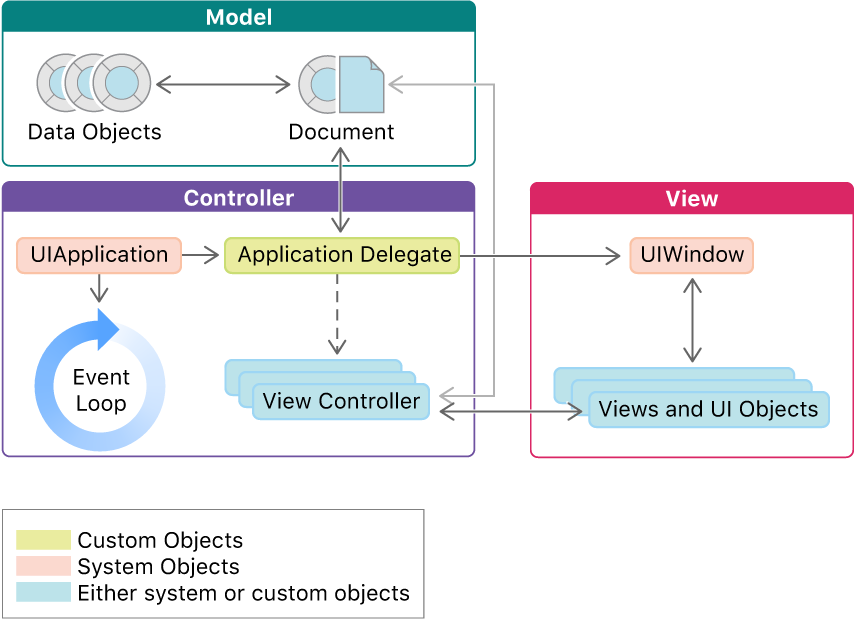
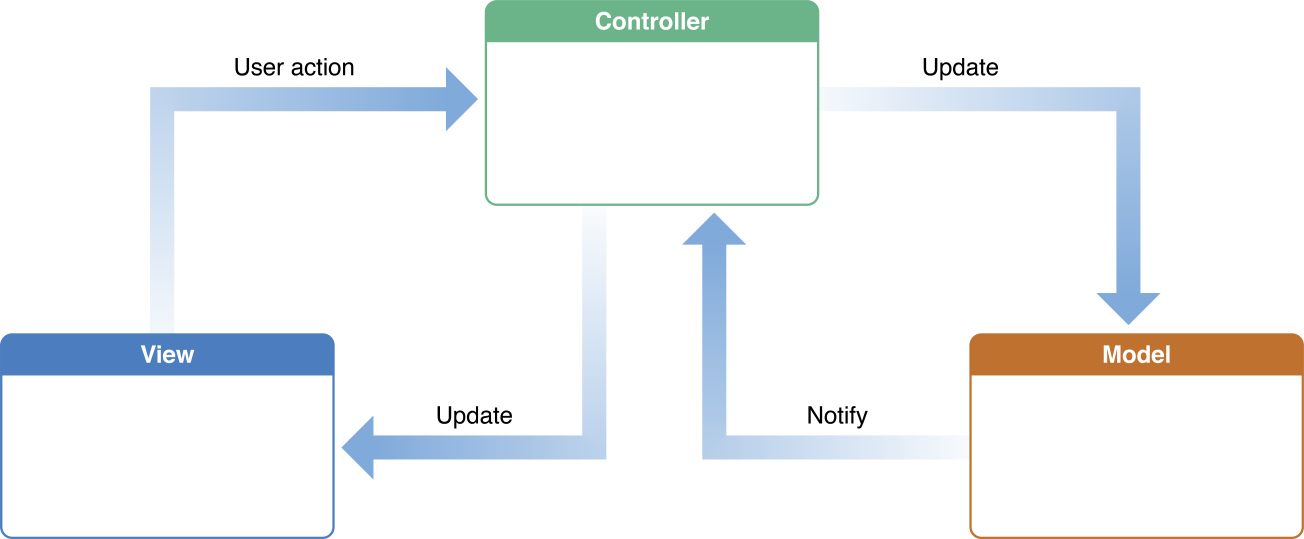
有了以上這些資訊,我們可以推導出,文件 Document 最好用 class 來寫。怎麼說呢?首先,文件必須要有一個持續存在的實體,如此才能夠隨時通知 controller 資料的變動,並且進行非同步或甚至自動的資料更新。這點 struct 與 class 都辦得到:
Engrmation above, we can deduce that document should be written by class. Why? First of all, document must have a persistent instance, so that it can notify controller of data change at any time, and perform asynchronous or even automatic data update. Both struct and class can do this
但如果 Document 是 struct 的話,它的實體就會直接活在 ViewController.document 裡面,像這樣:
But if Document is struct, its instance will live directly in ViewController.document, like this:
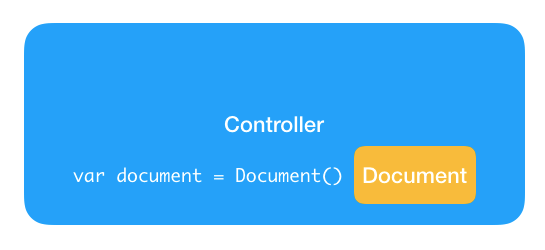
這樣已經稍微打破 MVC 的區隔了,但還不算甚麼大問題。真正的大問題出現在當我們將 document 指派給新辨識符,或者傳給函式當參數的時候。如果文件是 class 的話,所有這些動作都只會複製 Document 實體的位址,不會複製實體本身:
This is slightly breaking the MVC separation, but it’s not a big problem. The real big problem comes when we assign document to a new identifier, or pass it to a function as a parameter. If the document is a class, all these actions will only copy the address of the Document instance, not the instance itself
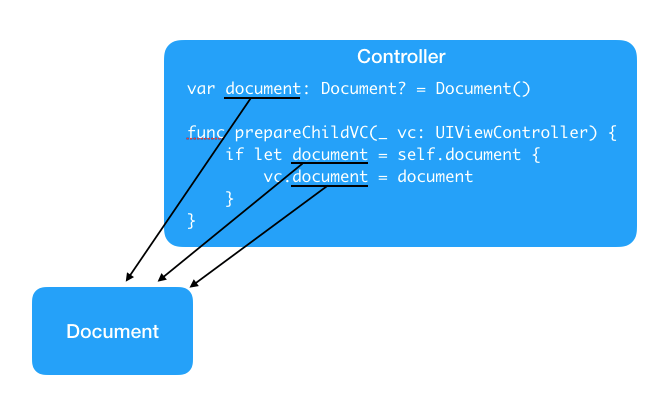
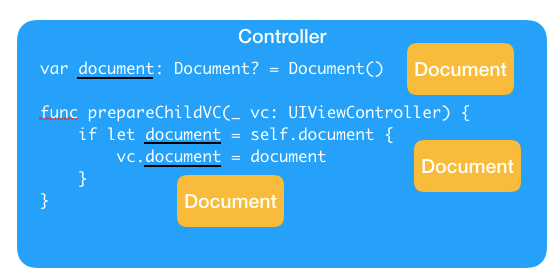
每次指派都會複製一個新的實體出來。這對於文件的職責來說,不只不必要,還會造成混淆。文件必須要持續存在才能發揮功用,所以當我們用了某一個實體,我們就必須確保接下來這個實體會持續存在,而且我們只能繼續用這個實體。Class 的遠端性設計確保了不管怎麼換辨識符,它的實體都只會有一個;但 struct 的本地性設計就讓實體的複製變得非常簡單,因此我們很容易不小心就複製了實體而不自知。所以,文件定義成 class 會是比較合理的做法。
Each assignment will copy a new instance out. This is not only unnecessary for the document, but also confusing. The document must exist to be useful, so when we use an instance, we must ensure that the instance will continue to exist, and we can only use the instance. The remote design of Class guarantees that no matter how the identifier is replaced, its instance will only have one; but the local design of struct makes the instance copy very easy, so we easily copy the instance without knowing it. So, defining the document as class will be a more reasonable approach.
總的來說,用 class 來定義資料物件的話,就好像是在用雲端共享文件一樣:每個人的螢幕上都會有一份文件可以編輯,但這個文件並沒有存在電腦裡,而是跟雲端的版本連線,所以所有的變動都是直接在雲端版本上更新的。好處是方便,壞處是誰修改了甚麼東西經理不會知道(class 本身沒有帳號功能!)。
In summary, using class to define data objects is like using a cloud-shared document: everyone’s screen will have a document that can be edited, but the document does not exist on the computer, but is connected to the cloud version, so all changes are directly updated on the cloud version. The benefit is convenient, the disadvantage is that the manager does not know who modified what (class itself has no account function!).
只有一個 Controller 物件能存取文件
Only one Controller object can access the document
如果不想要在每個 controller 物件的定義裡都去處理對文件的溝通的話,可以只讓一個主要的 controller 物件去管理文件就好,比方說 AppDelegate 或者是某個根 view controller。讓這個主要的 controller 物件拿到文件裡的資料物件之後,再把資料物件直接傳給別的 controller 物件來用:
if you don’t want to handle the communication with the document in the definition of each controller object, you can only let a primary controller object manage the document, such as AppDelegate or a root view controller. After the primary controller object gets the data object in the document, it passes the data object directly to other controller objects to use:
// singleton
class PostManager {

    static let shared = PostManager()

    // ...

}

class PostTableViewController: UITableViewController {

    // 只有這裡才能存取 postManager。
    var postManager = PostManager()

    func presentPostViewController(post: Post) {
        let postVC = PostViewController()

        // 只需傳遞資料物件過去。
        postVC.post = post
        present(postVC, animated: true)
    }

}

class PostViewController: UIViewController {

    // 只需管理一個資料物件。
    var post: Post?

    override func viewDidAppear(animated: Bool) {
        super.viewDidAppear(animated: animated)

        // 直接拿資料物件來用。
        if let post = self.post {
            // 顯示 post。
        }
    }

}
static variable and class variable
What’s the difference between a static variable and a class variable?
Both the static and class keywords allow us to attach variables to a class rather than to instances of a class. For example, you might create a Student class with properties such as name and age, then create a static numberOfStudents property that is owned by the Student class itself rather than individual instances.
Where static and class differ is how they support inheritance: When you make a static property it becomes owned by the class and cannot be changed by subclasses, whereas when you use class it may be overridden if needed.
class Person {
    static var count: Int {
        return 250
    }

    class var averageAge: Double {
        return 30
    }
}

class Student: Person {
    // THIS ISN'T ALLOWED
    // override static var count: Int {
    //    return 150
    // }

    // THIS IS ALLOWED
    override class var averageAge: Double {
        return 19.5
    }
}
Required init
class Animal {
    var name: String

    required init(name: String) {
        self.name = name
        print("Animal initialized")
    }
}

class Dog: Animal {
    var breed: String

    init(name: String, breed: String) {
        self.breed = breed
        print("Dog initialized")
        super.init(name: "dogie")
    }

    required init(name: String) {
        self.breed = "yee"
        super.init(name: name)
    }

}
MVC and Singleton
MVC Explain

class ToDoStore {
    static let shared = ToDoStore()

    private(set) var items: [ToDoItem] = []
    private init() {}

    func append(item: ToDoItem) {
        items.append(item)
    }

    var count: Int {
        return items.count
    }

    func item(at index: Int) -> ToDoItem {
        return items[index]
    }
}

class ToDoListViewController: UITableViewController {
    @objc func addButtonPressed(_ sender: Any) {
        let store = ToDoStore.shared
        let newCount = store.count + 1
        let title = "ToDo Item \(newCount)"

        store.append(item: .init(title: title))
    }
}

extension ToDoListViewController {
    override func tableView(_ tableView: UITableView, trailingSwipeActionsConfigurationForRowAt indexPath: IndexPath) -> UISwipeActionsConfiguration? {
        let deleteAction = UIContextualAction(style: .destructive, title: "Delete") { _, _, done in
            ToDoStore.shared.remove(at: indexPath.row)
            done(true)
        }
        return UISwipeActionsConfiguration(actions: [deleteAction])
    }
}
@StateObject and @ObservedObject
How to use @ObservedObject to manage state from external objects
You should not use this property wrapper to create the initial instance of an observable object – that’s what @StateObject is for.
Remember, please do not use @ObservedObject to create instances of your object. If that’s what you want to do, use @StateObject instead.
class {
    @Published var score: Int = 0
}

struct InnerView: View {
    @ObservedObject var progress: UserProgress

    var body: some View {
        Button("Increase Score") {
            progress.score += 1
        }
    }
}

struct ContentView: View {
    // This isn't recommended
    // @ObservedObject var progress = UserProgress()

    @StateObject var progress = UserProgress()

    var body: some View {
        VStack {
            Text("Your score is \(progress.score)")
            InnerView(progress: progress)
        }
    }
}
StateObject & ObservedObject
Once you understand the issues with @ObservedObject, the significance of @StateObject becomes apparent. @StateObject is an upgrade of @State and is specifically designed to store ObservableObject class instances. While @State is created to store struct states, @StateObject is created to store ObservableObject class instances. It ensures that the instance of this class will not be recreated with the view, thus solving the problem.

struct ContentView: View {
    @State private var showRealName = false
    var body: some View {
        VStack {
            Button("Toggle Name") {
                showRealName.toggle()
            }
            Text("Current User: \(showRealName ? "Wei Wang" : "onevcat")")
            ScorePlate().padding(.top, 20)
        }
    }
}

class Model: ObservableObject {
    init() { print("Model Created") }
    @Published var score: Int = 0
}

struct ScorePlate: View {

    @ObservedObject var model = Model()
    @State private var niceScore = false

    var body: some View {
        VStack {
            Button("+1") {
                if model.score > 3 {
                    niceScore = true
                }
                model.score += 1
            }
            Text("Score: \(model.score)")
            Text("Nice? \(niceScore ? "YES" : "NO")")
            ScoreText(model: model).padding(.top, 20)
        }
    }
}

struct ScoreText: View {
    @ObservedObject var model: Model

    var body: some View {
        if model.score > 10 {
            return Text("Fantastic")
        } else if model.score > 3 {
            return Text("Good")
        } else {
            return Text("Ummmm...")
        }
    }
}
hws - What is the @ObservedObject property wrapper?
That Order class uses @Published so it will automatically send change announcements when items changes, and ContentView uses @ObservedObject to watch for those announcements. Without @ObservedObject the change announcements would be sent but ignored.
class Order: ObservableObject {
    @Published var items = [String]()
}

struct ContentView: View {
    @ObservedObject var order: Order

    var body: some View {
        // your code here
    }
}
ObservableObject
Custom Subclass of NSObject
Custom subclasses of NSObject
NSObject is what’s called a universal base class for all Cocoa Touch classes. That means all UIKit classes ultimately come from NSObject, including all of UIKit. You don’t have to inherit from NSObject in Swift, but you did in Objective-C and in fact there are some behaviors you can only have if you do inherit from it. More on that in project 12, but for now just make sure you inherit from NSObject.
hws - project 12
Why do we need a class here when a struct will do just as well? (And in fact better, because structs come with a default initializer!)
Why do we need to inherit from NSObject?
It’s time for the answers to become clear. You see, working with NSCoding requires you to use objects, or, in the case of strings, arrays and dictionaries, structs that are interchangeable with objects. If we made the Person class into a struct, we couldn’t use it with NSCoding.
The reason we inherit from NSObject is again because it’s required to use NSCoding – although cunningly Swift won’t mention that to you, your app will just crash.
Getter / Setter and Property Wrapper
class Person: NSObject {
    var name: String? {
        get {
            return self.name
        }
        set {
            self.name = newValue
        }
    }
}
Juejin
Swift set/get方法
为什么不直接返回name或者直接给name赋值呢,而是通过另外一个变量 _name 来存储真正的值呢?
这么写会陷入 self.name 的死循环的哦,所以不能这样写。
本质上 _name 这个变量存储真正的值,name 这个变量更多的作用相当于提供了一个方法,提供了其set和get方法,通过他的set和get方法给 _name 赋值。这一点和OC是一样一样的。
class Person: NSObject {
    var _name: String?
    var name: String? {
        get {
            return _name
        }
        set {
            _name = newValue
        }
    }
}
struct HasWrapper {
    @Wrapper var x = 0

    func foo() {
        print(x) // `wrappedValue`
        print(_x) // wrapper type itself
        print($x) // `projectedValue`
    }
}